
The Google Business Profile Mistake That’s Costing You Local Customers
Most small businesses have a Google Business Profile but aren’t using it to its full advantage. If you set up your Google Business Profile and left it sitting untouched, you could be missing out on local clients. Let’s get into what a Google Business Profile does, the mistakes most small business owners make, and how to fix them.
If you haven’t already, check out Why Isn’t My Website Showing Up on Google? for the bigger picture.
What Is a Google Business Profile (and Why It’s Not Optional)
A Google Business Profile (formerly Google My Business) is a free tool that lets your small business show up in local searches and on Google Maps. It tells Google what you do and where you’re located so you’re more likely to show up in local search results.
Here are some examples of location-based or local searches:
- hair salon near me
- best tattoo artist in Delaware
- personal trainer in Philadelphia
The Difference Between Your Website and Your Google Business Profile
Your website is your primary real estate on the internet. It’s your online storefront: the place where you can show off your expertise and build trust with your audience.
Your Google Business Profile is an online listing that provides a snapshot of your business. Ultimately, it gives people a reason to click through to your website to learn more about your services. A Google Business Profile should include:
- Location
- Contact information
- Photos
- Posts and updates
- Client reviews
- Ratings
What that looks like in practice: let’s say you’re a personal trainer located in Philadelphia. Someone does a search for “personal trainer in Philadelphia” and your Google Business Profile pops up. They see you’re open, you’ve got 30+ reviews, and you’re a 10-minute drive away. That’s enough to make them want to click, but it’s your website that seals the deal by sharing your training style, client experience, and results. The profile gets you noticed; the website gets you booked.
A website and a Google Business Profile serve different purposes. As a small business owner, you need both.
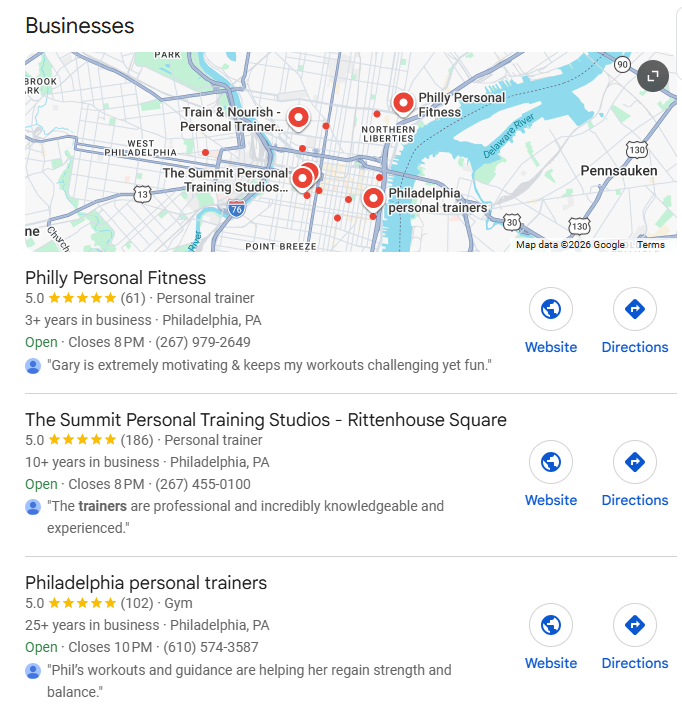
Why Google Shows This Before Your Website in Local Searches
When someone searches “personal trainer in Philadelphia,” they’re telling Google what they want and where they’re looking. That’s a local search, and Google treats it differently than a regular one.
Before serving up a list of websites, like in a typical search, Google shows a map and the “Local Pack” first, just below the AI Overview. The Local Pack consists of the top three Google Business Profile listings that best match the search. Your profile listing can quickly answer initial questions, such as where you’re located and when you’re open. If the person searching likes what they see, they’ll click through to your website to find out more.
The Mistake: What “Set It and Forget It” Actually Costs You
Just like it’s important to update your website content routinely, you should also keep your Google Business Profile up to date. Fresh content tells Google that your business is active, and staying on top of it means more than just posting updates. Your insights are part of that upkeep too, since they show you what’s working. Neglect either one and your profile starts costing you visibility and local business.
Outdated Hours, Photos, and Info That Drive Customers Away
At the very least, the basic information in your Google Business Profile needs to be accurate. If your business hours change, update them. If your photos show an old location or service, replace them with current ones.
Imagine a potential client showing up in person at a business that’s listed as open but actually isn’t. Or calling a phone number that’s been disconnected. Those are surefire ways to lose business.
Make it easy for potential clients to understand what you do and how to contact you. If they can’t, they’ll hire your competition instead.
Ignoring Your Profile’s Insights
Whether you know it or not, your Google Business Profile is tracking your performance data. The search terms people used to find you, calls and bookings, and website clicks are all right there in your business profile.
Most small business owners ignore this feature, but at a cost. You won’t know if people are finding you through the right searches, or if your profile is bringing in calls but nobody’s visiting your website (or vice versa). Checking your insights periodically lets you see what’s working and what search terms to focus on in your content.
How to Fully Optimize Your Google Business Profile
If you haven’t touched your business profile in a while, this section will help you get it up to par. Here’s what to focus on first.
Choosing the Right Categories and Services
Make sure the primary category you’ve selected is appropriate for your business. This can be tricky, as there are a lot of them and many are broad. Pick the one that best represents your business, and add secondary categories to help narrow it down.
Use the Services section to describe your offers in detail. Use keywords to describe what your services are and who they’re for. Remember, if a service isn’t listed, Google has no way of knowing you offer it, so include them all.
Photos That Actually Help You Rank
Recent, high-quality photos are essential. If you have a storefront or a company vehicle, include pictures of those. Depending on the type of business you have, you can also post photos of your products or before-and-after pictures. Google recommends adding at least three photos for every aspect of your business (your location, your team, your products, etc.).
Using Google Posts to Stay Active
Google Posts are an often underutilized section of Google Business Profiles, but they shouldn’t be. This feature allows you to post updates about your business, offers, and events you’re hosting. It’s also a great opportunity to share your latest blog post or a sale you’re running.
Google Posts stay on your profile for six months (unless a date range is specified). After that, they’re automatically archived.
Reviews: The Most Ignored Part of Your Profile
Why Review Quantity and Recency Matter for Ranking
The more reviews you have and the more recent they are, the more likely Google is to recommend you to people searching for your services.
Of course, not every review is guaranteed to be glowing. Let’s get into that next.
How (and Why) to Respond to Every Review
Take a moment to respond to each and every review you get—good or bad. For one thing, Google sees each reply to a review as proof your listing is active. And from your potential clients’ perspective, not only does it show them you’re responsive, but the way you respond to reviews also makes an impression.
When responding to positive reviews, a simple “thank you for your feedback!” or “It was a pleasure doing business with you” will do. For bad reviews, take the time to write a thoughtful response. Negative feedback stings, but prospective clients care more about how you respond to a negative review than the review itself. A professional response that takes responsibility and offers to make the situation right (when appropriate) can go a long way.
How Long It Takes to See Results
What Changes Quickly vs. What Takes Time
Some parts of your Google Business Profile take effect right away. For instance, your photos, posts, and responses to reviews all show up immediately.
But local SEO is still a long game, and building authority with Google takes time. The best thing you can do for your local SEO is to update your business profile consistently. Post updates, add new photos, and respond to every review. These things indicate that your profile is active and incentivizes Google to show it.
FAQ
Do I really need a Google Business Profile?
If your small business serves local clients, you absolutely need a Google Business Profile. Even if you’re a service provider who serves clients all over, a Google Business Profile can still help you attract clients in your local area.
Do I need a website if I have a Google Business Profile?
Yes, you need both. Your Google Business Profile is meant to come up in local search results, but your website still needs to do the selling.
How often should I update my Google Business Profile?
Ideally, you should update your Google Business Profile on a weekly basis. This can include adding a new post, uploading new pictures, or adding a new service. Regular updates tell Google that your listing is active.
The Bottom Line on Your Google Business Profile
A Google Business Profile isn’t something you set up once and check off your list. The small business owners who benefit most from it are the ones who treat it like any other part of their marketing. Posting, adding photos, responding to reviews, and checking insights regularly all make a difference. Give yours a little consistent attention, and it’ll keep sending local business your way instead of to your competition.
If you’re not sure where your Google Business Profile stands, that’s one of the things I check in my SEO Audits.