Why Isn’t My Website Showing Up On Google?
A Small Business Owner’s Guide to SEO
If you’ve ever searched “why isn’t my website showing up on Google,” you’re not alone. Maybe you hired a website designer and your site is the most beautiful thing you’ve ever seen. Or maybe you DIY’ed it and it looks pretty damn good nonetheless. You have a blog, a portfolio, and a killer lineup of services just waiting for your ideal customer to find them.
Buuut… crickets.
This is more common than you might think. It even happened to me with my first website. When I started my virtual assistant business back in 2017, I had never even heard of SEO. I didn’t have the slightest clue how to attract clients to my website. I thought I could just publish a website and people would magically find it.
If this sounds at all familiar, keep reading. This guide covers the fundamentals of SEO you need to know—what it is, why it matters, and how to do it—so your website can finally show up on Google. (Note: I’m using “Google” as a blanket term here, so just know that when I say “Google” I’m also referring to other search engines and AI tools.)
What Is SEO, Exactly?
I’m glad you asked! Put simply, SEO is the process of helping your website get found by the right people, by helping search engines (and AI) understand what your website is about. Some of the key elements of SEO are keywords, meta descriptions, heading tag structure, internal links, backlinks, and local SEO.
Unfortunately, many website designers don’t know enough about SEO to implement it correctly. So your website can be a total work of art and still not convert.
Why?
Because it hasn’t been optimized in a way that search engines can understand it. And that means it isn’t being served up in search results or AI Overviews.
How Google Decides What Websites to Show
Google’s primary goal is to give users the best, most useful, most authoritative answers to what they’re searching for. In order to do this, Google has to know what content is out there and what it all means.
Crawling and Indexing
Think of the internet as an enormous library, and each website and web page out there as a resource in it. Google constantly “crawls” the web with software that reads and organizes pages in a repository, similar to a card catalog. (I know, I’m dating myself here!)
Then, when someone performs a search, Google digs through its repository (or index) and returns pages that match the query. But wait, remember I said Google wants to provide the best, most useful results? As I’m sure you’re well aware, not all content on the internet is created equally. (Let’s be real, some of it downright sucks.) Being indexed gets you in the door, but ranking well is what gets you seen.
What Is a Search Ranking? (and How to Improve Yours)
So how does Google decide what content is worthy of showing up in the coveted top positions on the search engine results page (SERP)? It uses a ranking system that measures:
- Meaning
- Relevance
- Quality
- Usability
- Context
These factors are influenced by things like:
- Keywords used
- Search intent
- Expertise and trustworthiness
- User experience (i.e., page speed and accessibility)
- Location
The more relevant, helpful, and user-friendly a web page is, the higher it is likely to rank on the SERP. If your business isn’t showing up on Google, there’s a good chance your website is missing some of these elements.
Why SEO Is Important for Small Businesses
SEO is the difference between a website that gets found organically by its target audience and one that doesn’t. It’s an effective, no-cost way of increasing website traffic, reaching the right people, and building credibility with your audience. And when your audience trusts you, they are far more likely to stick around and become paying customers. Which is the actual point, right?
Additionally, when your small business website is optimized for search engines, it improves the user experience (UX). Good UX means people will spend more time on your site and there’s a better chance they’ll come back.
A solid SEO strategy helps your website work for you, bringing in leads, converting into sales, while you’re off running your business.
SEO vs. Paid Ads
So what’s the difference between SEO and paid advertising? SEO is the work you put into your website to help it gain organic, unpaid traffic. Paid ads are a way of instantly making your site visible on the first page of Google for a fee.
The key difference (aside from cost) is that paid ads only work as long as you’re paying for them. Once you stop paying, your website disappears from the search results page just as quickly as it appeared. Conversely, SEO gains traction gradually, building your site’s authority over time and earning its spot there.
Both are legitimate ways of gaining website traffic and visibility. Only one of them is truly sustainable for most small businesses, which often lack the budget to pay for ads, especially in the beginning.
Of course, it’s possible to utilize both SEO and paid ads. But for long-term growth, I highly recommend making sure your SEO foundations are in place first.
The Long-Term Value of Showing Up Organically
Not only is SEO completely free, it also compounds over time. If you’re optimizing for SEO and adding new (relevant) content regularly, your domain authority and trust factor will continue to increase. More authority means more visibility, more website traffic, and, ultimately, more customers.
SEO is a long-term strategy, not a quick fix. It doesn’t take effect overnight, but it is the most sustainable way to build trust with your audience and search engines.
What Is Local SEO and How Does It Help Your Business Get Found?
Local SEO is the process of helping your business get found when people search for your services in a specific geographical area. If your small business serves clients locally, having a local SEO strategy is essential.
At minimum, local SEO should include maintaining a Google Business Profile, keeping your local citations consistent (name, address, and phone number, or NAP) across all platforms, and ensuring your location is prominently listed on your website.
Google Business Profile for Small Businesses
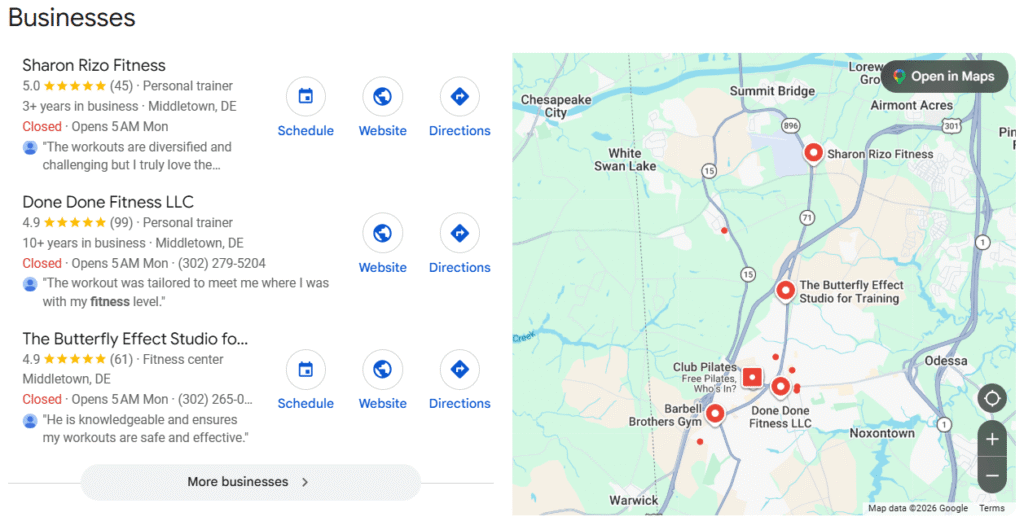
A Google Business Profile is a free tool that helps your business show up in local searches and Google Maps. They’re the listings that show up at the top of the page when you do a location-based search (i.e., “[industry/service] near me”). This coveted spot is called the “Local Pack.” Google only displays the top three Business Profiles in the Local Pack, and they get 42% of clicks in 2026.
Google Business Profiles include details about your business such as NAP, your business hours, and photos. You can also post updates, and your customers can leave ratings and reviews. Regularly updating your Business Profile with new images, posts, and reviews makes it more likely to show up in local search results.
Why Is NAP Consistency Important for Local SEO?
When your business name, address, and phone number are consistent in all of your online citations, you gain more credibility with Google. Additionally, using the same business name for all of your online entities (website URL, social media handles, Google Business Profile, etc.) tells Google that you own all of them. And as a result, Google is more likely to include your business website in local search results.
Using Local Keywords on Your Website
Just as your small business website needs to make it clear what you do and who you serve, it also needs to list where you’re located. This is especially the case for brick-and-mortar stores and service providers who service their local area.
I’ve seen websites for brick-and-mortar businesses that don’t clearly indicate where they are located. Sometimes they just list a city, but not a state. This is a disaster for local SEO because if you’re located in a city that shares a name with cities in other states, it’s much harder to rank for those searches.
However, even online service providers who serve clients in any location can benefit from local SEO. After all, just because you can work with clients who live in another state doesn’t mean you’d turn away clients from yours!
How to Increase Website Traffic with Organic SEO
Whether you’re a local business that serves clients in your area or an online service provider with clients from all over, organic SEO strategies can help your website get found.
On-Page SEO: Optimizing What’s Already on Your Site
On-page SEO encompasses everything you can control on your website to help it get found. It includes your titles, headlines, meta descriptions, URL slugs, word count, alt text, and internal linking. Using keywords strategically, having a sufficient amount of copy on each page, and including links to your other pages are all ways to improve your on-page SEO.
Content Strategy: How Blogging Helps You Get Found
Since Google prioritizes relevant, trustworthy content, blogging is a great way to position yourself as an expert in your niche. Writing unique, helpful content that answers your audience’s exact questions helps you show up in search results and get more traffic to your website. A blog allows you to keep adding new content to your site and increasing the number of keywords you rank for.
Internal Linking for the Win
Including internal links on all of your pages helps keep people on your website longer. For example, if someone is reading a blog post that links to a post on a related topic, they may be inspired to click through. Or if they’re checking out your About page and find a link to your Services page, chances are they’ll want to see what your offers are all about. The longer you can keep someone on your website, the more likely they are to become a paying customer. It also tells Google that your website is useful, which can boost your ranking potential.
Backlinks
High-quality backlinks, which are links to your website from other websites, can also help boost your SEO. The “high quality” part of that statement is important because not just any link to your site is helpful. Paid or spammy links from low-quality websites can actually hurt your SEO. Guest blogging, being listed in online directories, or getting featured on other (credible) websites are all good ways to get backlinks.
Is SEO Worth It for Small Businesses?
If you’ve made it this far, you already know I’m going to say YES. Think about it this way: if SEO brings even one or two new clients to your door each month, it’s paying for itself, and then some. Unlike an ad campaign that you need to keep throwing money into, the work you put into SEO today can keep generating leads months or even years from now. That’s a return on investment most small businesses can get behind.
And you don’t have to do it all at once. Even small, consistent tweaks add up over time. Pick a few pages to optimize, write one blog post a month, or add some new photos to your Google Business Profile. SEO rewards consistency, not perfection.
FAQ
How long does SEO take to work?
SEO is a long game. Most small businesses can start seeing results within 3–6 months, but it’s largely dependent on how competitive your niche is, how new your website is, and how consistently you are making updates and creating new content.
Can I do SEO myself, or do I need to hire someone?
You can absolutely do SEO yourself! SEO can seem confusing at first, but once you get the hang of it, it’s pretty straightforward. That being said, if you don’t have the time or desire to learn it, that’s when hiring an SEO specialist can be the right move.
What’s the difference between local SEO and regular SEO?
“Regular” SEO is what goes into a website to help it show up in Google searches. Local SEO is how you optimize your website to target clients in a specific geographical area. It helps brick-and-mortar businesses and service providers like photographers or electricians with in-person clientele get found in local searches.
How do I know if my SEO is working?
Free tools like Google Analytics (GA4) and Google Search Console can help you measure your SEO progress. Google Analytics lets you see where your traffic is coming from (i.e., organic, referral, or paid sources) and track your engagement rates. Google Search Console tells you what pages are performing the best and what keywords you’re ranking for.
Ready to Show Up on Google? Here’s Where to Start
Although it can seem overwhelming at first, SEO really isn’t as scary as it sounds. Start small by brainstorming a list of keywords your customers would use to find you. Make sure those keywords appear in your page titles, headings, and website copy. Think about the questions that your clients always ask, and turn them into blog posts. Small, consistent steps add up over time.
If you’re still feeling unsure about where to start or want to know where your SEO stands right now, I’d love to help! Book an SEO Audit.